Turn Any Google Sheet Into a Smart Project Dashboard in 5 Minutes
Still filtering spreadsheets to find overdue work before every project meeting? This lightweight dashboard sits on top of your existing Google Sheet tracker, with no code and no migration. It automatically highlights what's overdue, what's coming up, and what's missing an owner. Copy the engine once and connect it to as many trackers as you need.

PMO, ZPS
Every PMO has experienced this moment.
Someone asks, "What's actually overdue?"
The answer is somewhere in your tracker. You know it is. And if that tracker is a Google Sheet, you know the routine: you start filtering. Then filtering again. Maybe you sort by owner, hide a few columns, open another tab, or copy rows into a temporary view. By the time you've pieced everything together, the conversation has already moved on.
The information was never missing.
It just wasn't easy to see.
That frustration pushed me to build something different - not another project management tool, but a smarter way to work with the Google Sheets trackers that many of us still rely on alongside tools like Jira and Asana.
The Problem Isn't Google Sheets
Most teams work across a mix of tools. Jira for delivery, Asana for tasks, Confluence for documentation. Google Sheets is one of them, and it's often where the more flexible trackers end up: action logs, RAID lists, cross-team follow-ups, and anything that doesn't fit neatly into a ticketing system. For that kind of work, Sheets is fantastic. It's flexible, familiar, and everyone already knows how to use it.
But reading that data is another story.
As projects grow, trackers become larger, filters become more complex, and finding the few items that actually need attention becomes harder than updating them.
Instead of spending meetings discussing risks and decisions, we spend them trying to build a view that shows where those risks are.
That's time we never get back.
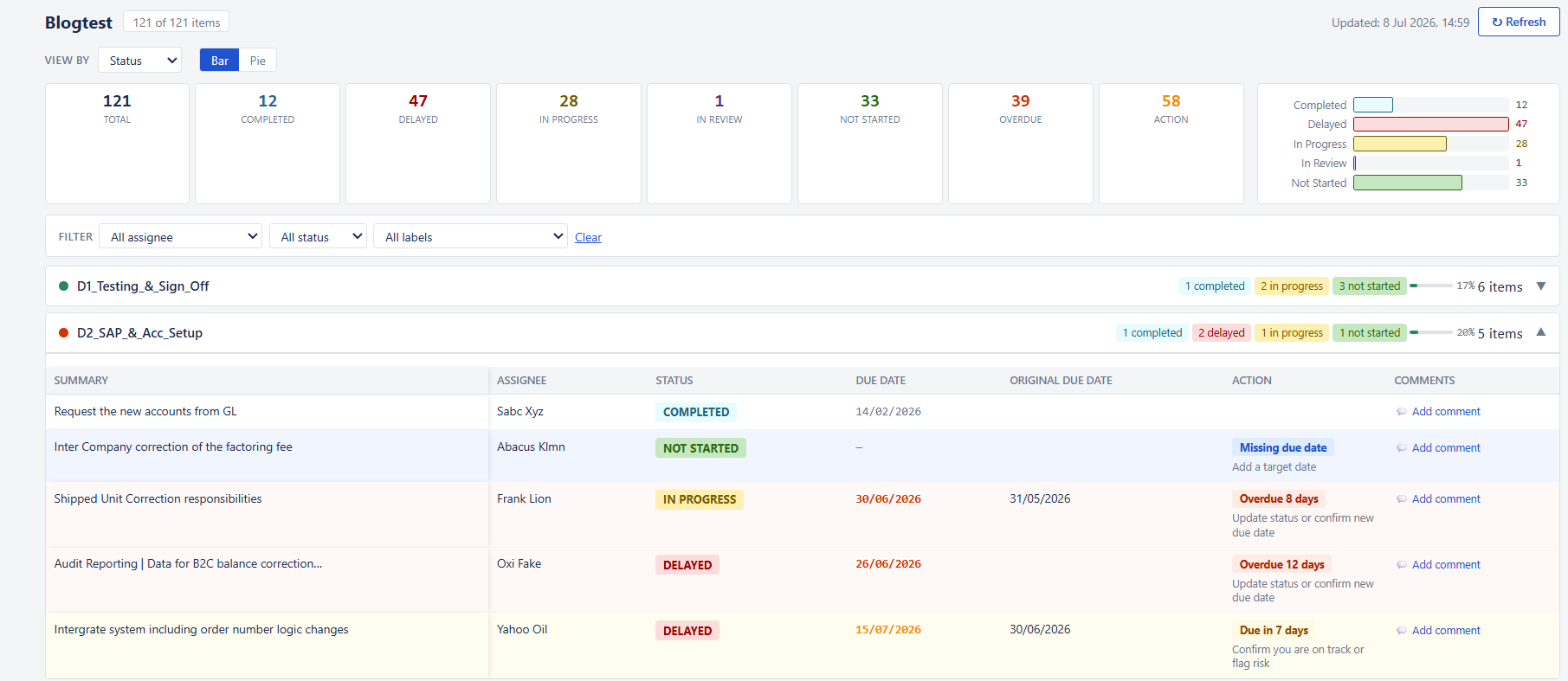
The generated dashboard: overdue rows glow red, items needing a decision are tagged, and everything groups and filters by the columns you already have.
A Dashboard That Thinks Before You Do
Rather than replacing the spreadsheet, I built a dashboard that sits on top of it.
Within a few minutes, it transforms any existing tracker into a clean, interactive workspace that groups information the way your team works. It highlights overdue activities, surfaces upcoming deadlines, identifies missing owners or dates, and brings the most important work to the top - before you even start scrolling.
Instead of asking:
"What should I filter?"
you're immediately asking:
"What should we do next?"
That's a very different conversation.
Built Around Your Existing Process
One design principle mattered more than anything else:
Don't force teams to change how they work. If your team's work lives in Jira or Asana, keep it there. This is for the trackers that already live in Google Sheets.
The dashboard works with the spreadsheet you already have - and it works around it, not inside it. All of the logic lives in its own separate engine file, completely apart from your tracker. Open your Google Sheet and you'll find exactly what you've always found: rows, columns, your data. No script editor, no code, nothing anyone can accidentally break while updating a status.
A simple setup wizard asks which columns contain status, due dates, owners, grouping fields, and completed states. That's it.
No coding.
No formulas.
No migration.
If your tracker changes later, you simply rerun the setup and the dashboard adapts automatically.
One Engine, Any Number of Dashboards
Here's the part that changed everything about how far this can scale.
Because the logic lives outside the spreadsheet, one engine isn't tied to one tracker. Connect it to a Google Sheet and it builds a dashboard from that sheet's columns. Connect it to a second sheet - a different team, a different set of fields entirely - and it builds a second dashboard, just as easily, without a single line of code duplicated.
Every dashboard it powers lives behind one URL, with a simple switcher to move between them. Improve the engine once, and every dashboard connected to it improves with it.
For a PMO supporting more than one workstream, that's the difference between building five separate dashboards and running one setup wizard five times.
More Than Just Another Dashboard
What surprised me most wasn't the cleaner interface - it was how naturally the tool fit the way we already work. Each task is evaluated based on its current status and due date. Rather than expecting someone to interpret the data, the dashboard explains what needs attention in plain language.
Open tasks past their deadline are flagged with the number of overdue days.
Upcoming deadlines are highlighted before they become problems.
Missing owners, missing due dates, or work that hasn't started are surfaced automatically.
Live counters at the top give an instant health check of the project, allowing teams to understand where attention is needed within seconds.
No more hunting through hundreds of rows.
Not Just Read-Only
Most dashboards stop at visualization.
This one doesn't.
Statuses can be updated directly from the dashboard.
Due dates can be changed without opening the spreadsheet.
Comments can be added in context, and every update is written back to the original Google Sheet instantly.
Those comments are timestamped automatically, creating a lightweight audit trail without any additional effort.
The dashboard becomes more than a reporting tool - it becomes the place where work actually happens.
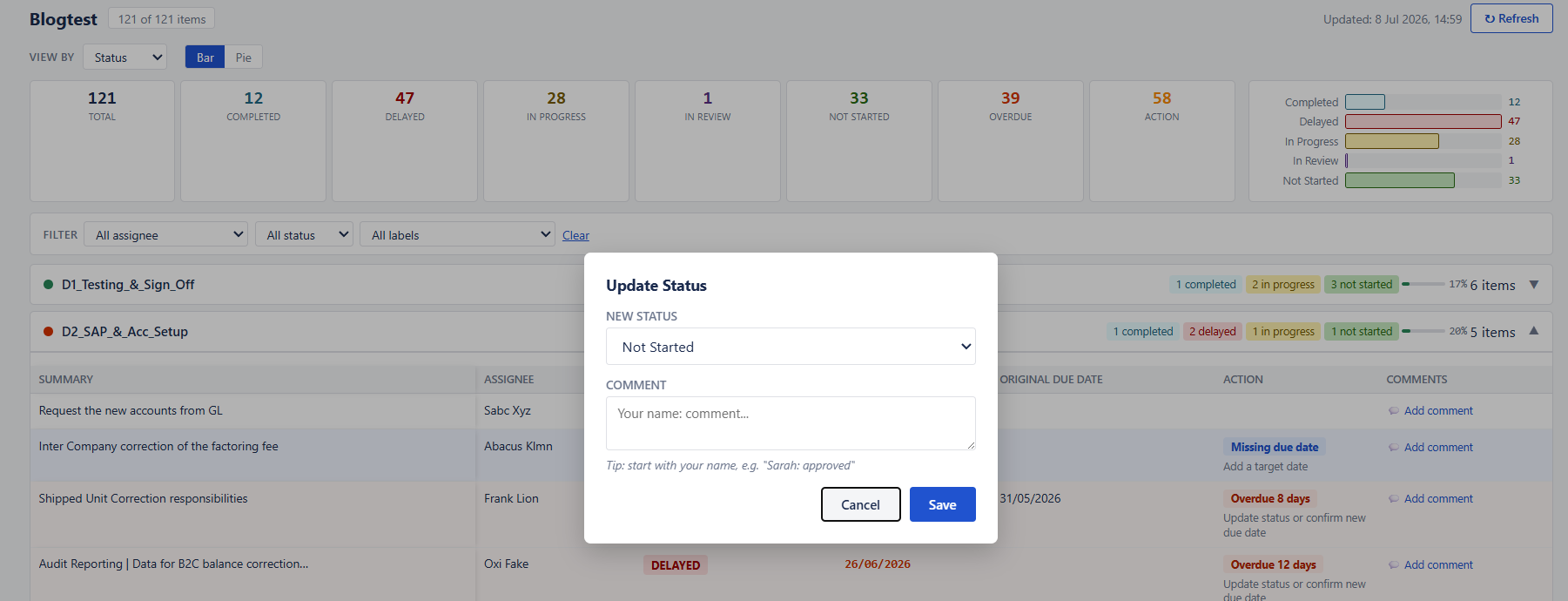
Change a status, move a date, or leave a comment from the dashboard - it writes straight back to the sheet.
Why This Matters for PMOs
PMOs don't create value by filtering spreadsheets.
We create value by helping teams make informed decisions early.
Every minute spent searching for information is a minute not spent resolving risks, removing blockers, or supporting delivery.
Since introducing this dashboard, project reviews have become noticeably different.
Meetings start with the issues already visible.
Discussions focus on actions instead of administration.
The data stays where it belongs, but the attention goes exactly where it's needed.
Not Just for PMOs
Although I built this with project management in mind, the concept applies almost anywhere.
Operations teams tracking incidents.
People teams managing onboarding.
Procurement teams following vendor approvals.
Finance teams monitoring actions.
Any process that lives in a Google Sheet can benefit from a dashboard that automatically highlights what deserves attention.
Give It a Try
I've attached the engine file along with simple setup instructions. Copy it once, connect it to one of your existing Google Sheets, and see how it feels.
If it saves you just one round of frantic filtering before your next project review, it's already worth it.